
Managing the operational flow of Picnic’s automated Fulfilment Centers (FCs) is not easy: it requires balancing extreme efficiency with complex workflows to ensure swift deliveries to your door as soon as possible. Given our intricate systems and high daily order volumes, it’s critical to keep a close eye on the overall processes. This is the job of our so-called Controllers. Imagine a dedicated Control Room with a team looking full-time at a big wall of screens showing all kinds of live data. Where are the bottlenecks? Is a specific part of the process running behind? Can we start picking the next batch of orders? What should we do with products that are out of stock?
Our Controllers therefore need to be equipped with a wide range of skills: they must understand our systems extremely well, navigate through many concurrent processes, and instinctively grasp what deserves immediate priority and what can wait. In case of issues, e.g. a piece of hardware throwing an error, controllers need to figure out how to recover as quickly as possible.
Relying entirely on the constant focus and memory of controllers in this environment creates a major dependency. In this article, we will share how we see our Control Room evolving into an intelligence-guided setup. We will take you through our long-term vision and one project we have already implemented.
The Challenge: Information overload vs. efficient decisions
So, how are controllers currently supported in their job? Today, they navigate multiple Grafana dashboards showing real-time data, inspect detailed hardware metrics, and monitor operations through our in-house central management interface: the WS (Warehouse Systems) Admin.
Luckily, the required information is already out there. However, we noticed that having enough information to decide does not necessarily enable the most efficient process.
We asked one of our UX Researchers to interview the controllers and investigate the day-to-day operations, which led us to identify three core problems:
- Repetitive tasks: A significant part of a controller’s job is focused on “If X, do Y” tasks. For example, if a truck for our next shipment is assigned to a specific dock, the driver moves toward that dock, and the controller must manually trigger the process to pull all the deliveries that belong in that truck.
- Unclear outcomes: It’s not always obvious if a controller has made the optimal decision. For instance: Do I wait until a certain stock item is replenished, risking a delayed shipment? Or do I cancel that product for the customer, so the delivery truck leaves exactly on time?
- No centralized task queue: It’s not clearly visible if there are more decisions to take. Because there is no consolidated queue of open tasks shown somewhere, controllers must constantly scan the horizon and deduce what needs to be done entirely on their own. This makes it easy to overlook a certain issue, which will only become visible once a problem has already grown to a noticeable size.
Due to the high number of tasks a controller must do to keep the day rolling smoothly, we became extremely dependent on individual controllers. Without automated alerting or queueing of manual tasks, we determined that if a controller goes on a break longer than 30 minutes, it can cause operational problems later in the day.
On top of this, different controllers might make different decisions during the day based on personal experience and preference. The result? Varying operational outcomes from day to day.
Introducing the Intelligent Control Room
How can we better support our controllers and unify their way of working? Please meet: the Intelligent Control Room.
After being live for almost five years with our first automated FC in Utrecht, it’s no surprise that some operational workarounds have been introduced and maintained over the years, even if they no longer make full sense. For the purely repetitive tasks, we decided it was time to automate them entirely within our software. This way, controllers can forget about those processes and focus on the decisions that matter most.
But for a large portion of their work, tasks are neither fully repetitive nor completely straightforward. They aren’t easily automated, but we do usually know what the ideal next step should look like. So why rely entirely on the constant focus and memory of our controllers?
The landing page for Controllers
We decided to create a dedicated space where the system explicitly suggests which actions a controller should take. The system recommends what to do and when to do it. The controller simply needs to accept or reject the task.
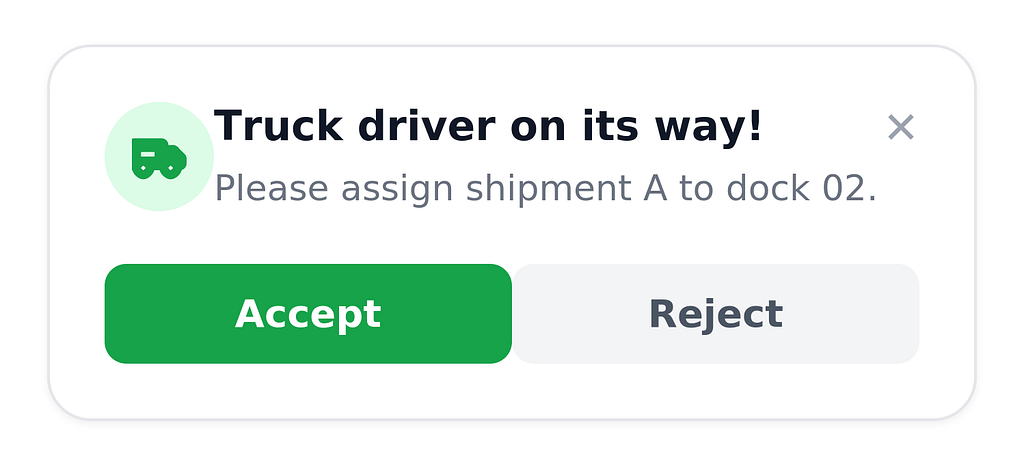
This setup helps us in multiple ways:
- Reduced cognitive load: The controller doesn’t have to constantly scan screens to figure out what is most urgent.
- Faster execution: Tasks are streamlined. It takes just one click to execute a complete selection, without needing to figure out the parameters and selection manually.
- Predefined prioritisation: Recommendations are categorized by severity and time-to-deadline, making it obvious what needs to be tackled first.
- Continuous feedback loops: By tracking actions, we can analyse decisions to better understand operations. If a controller always accepts a recommendation, we know we can fully automate it next. If they always reject it, we know our recommendation logic needs tweaking. In that case, we ask the controller for a quick reason from a pre-defined list of rejections so we can learn from it. But it can also simply happen that there is a physical problem that the software cannot detect and makes the controller deviate from our plan. We can also measure the time it takes for the controller to make the decision once the suggestion is shown on the screen, understanding how they use the page.
The technical architecture
Now let’s dive into the technical implementation of the project: how do we actually serve these recommendations to the UI? We need four key components:
- The recommendation types: Common operational actions, covering everything from starting order picking to solving stock shortages and keeping the pressure on our dispatching process.
- The triggers: Rules specifying when to prompt a controller (e.g., an order deadline is approaching, or a high number of picks require manual intervention).
- The target endpoint: A backend action triggered when a recommendation is accepted. Since these are tasks that controllers already execute manually, these existing backend API endpoints drastically reduce the integration.
- The query engine: A way to collect real-time data points across systems to decide if an action is needed. This was the trickiest part.
Frequent readers might know that we work with a distributed microservice setup in our warehouses; each microservice is responsible for a small domain, enabling us to scale and maintain easily.
While this modular setup brings massive benefits for scaling, it introduced a data aggregation challenge for the project: the data we need to trigger a single recommendation often lives across different microservices. We explored three solution directions:
- Query a single service: only works if a recommendation uses data from one domain.
- Amend one service with extra data from another: works if you only need one or two extra data points.
- Create a brand-new aggregator microservice that extracts data from all the different services.
Given the variety of recommendations we wanted to produce, option 3 looked like the winner. But then we realised: we already have a centralised space where all our real-time warehouse data is collected for operational analysis: our RTI (Real Time Insights) platform on ClickHouse!
Our RTI platform collects raw data from all Picnic data sources and stores it in real time to power our Grafana dashboards. Most of the dashboards that controllers use are based on this data.
But can we use an analytical platform to actively steer our operational microservices?
Yes, we can! By combining dbt and ClickHouse, we built a highly scalable system:
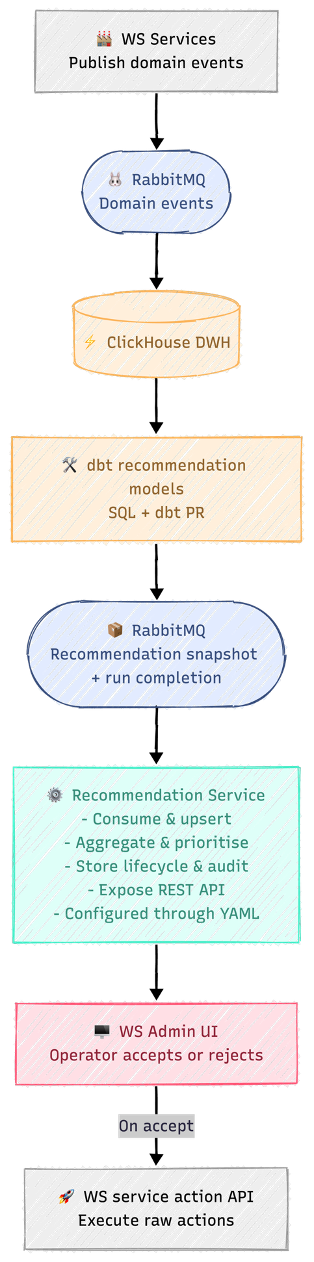
Each recommendation follows a clean, standardised pipeline:
- We write an SQL query and package it as a dbt model to handle the data transformation inside ClickHouse. The query will run every 30 or 60 seconds, handling idempotency.
- When this dbt model populates the designated table, ClickHouse utilises its native RabbitMQ Engine to automatically stream those records out as messages to our message queue.
- These messages are picked up by our dedicated, lightweight Recommendation Service, which stores, prioritises, and routes them to the WS Admin frontend page.
Once a recommendation is displayed on WS Admin, no further interaction with the RTI platform is required. When a controller clicks “Accept”, the UI calls the core backend endpoint directly, triggering the process instantly.
If you’re interested in our RTI setup, please read this article written by David Mischke. It explains exactly how it’s set up.
What about scalability?
A nice thing to share: if the endpoint to call already exists, this setup requires zero backend or frontend development when adding a new recommendation type. An automation analyst who wants to introduce a new alert can write the dbt model themselves. They only need minimal support in verifying the target endpoint and reviewing the dbt pull request. Once merged, the recommendation goes live automatically.
The hard questions
When building an operational pipeline out of an analytical data stream, a few critical questions naturally come up:
- How real-time is real-time? Currently, data streams into our RTI platform with a latency of less than 5 seconds. This is more than fast enough for triggering operational recommendations.
- With an extra external dependency comes an extra risk: what if the RTI platform goes down? This indeed imposes a risk, but in that case, all dashboards are down. This is therefore noticed straight away and, for multiple reasons, should be fixed immediately.
- What about race conditions? If data takes 5 seconds to sync, could a controller accept a recommendation for a task that was already resolved? To prevent this, the recommendation service double-checks the live state of the core microservice at the exact millisecond the button is clicked. If the action is no longer viable, the UI safely displays an error and clears the task.
Let’s think about the scenario where we see controllers always accepting the suggestion. We earlier said that this could be automated. Could we do that using the RTI queries? The answer is ambiguous: we can, but it might not be the best solution. With this setup, we are adding that extra dependency that might not be necessary if we were to build this within our existing WS services. Therefore, we will still reflect on how to automate once we are certain.
Vision towards a fully Intelligent Control Room
In the past months, we have taken massive steps toward making our Control Room more intelligent. But we can dream bigger!
You might have realised that we haven’t yet covered one of our core UX problems: How does a controller know they made the right decision? How can we predict that the decision to take is the best one?
This is a very complex problem to tackle. The first step is providing visibility into the immediate, cascading impact of an action. If you start a new batch of picking orders, will you immediately cause a jam on a conveyor line downstream? If you delay a truck to ensure every order is complete, what is the operational cost outside the FC, and will it cause a delivery delay for the customer?
These are easy questions to ask, but incredibly hard to answer:
- Warehouse ecosystem: An automated warehouse is its own delicate ecosystem with thousands of moving variables. Every day, and every hour, is different.
- Supply chain downstream: Fulfilment is not the last step in our supply chain. Calculating exact customer impact is difficult because many variables come into play after a delivery frame leaves our dock.
- Optimization problem: How do you mathematically weigh what is worse: a delivery that arrives late, or a delivery that arrives incomplete?
The path towards a more autonomous Control Room
To bridge this gap, we will take a phased approach toward fully predicting customer impact for FC decisions.
Precondition: feedback loop. Before we start our next project, it’s a must-have to have a proper feedback loop that determines if our previous decisions have been the right ones. This is essential to know if the prediction is to be trusted.
Phase 1: predictive model. Where are we headed next? Moving beyond just recommending what to do, to showing what will happen. We can start with predictive regression models on small processes to give controllers our best data-driven estimate of customer and operational impact before they click “Accept”.
The predictive model gives the ground truth that will help us in the next phase.
Phase 2: simulation. To tackle the complexity of the automated FC, we are looking into running parallel discrete-event simulations. With fancy words: the digital twin. By simulating the physical warehouse flow in the background, we can test a controller’s potential decision in a sandbox environment seconds before it happens.
Phase 3: Reinforcement learning. The ultimate dream is to use reinforcement learning to automatically discover the best operational strategies. We know that training an AI on the infinite variables of a live warehouse is a massive challenge. We will likely start by using traditional optimisation algorithms and heuristics within our simulations to guide decisions safely and start with small, straightforward processes first. With the sandbox environment we created in the previous phase, we are able to train the RL model in a low-risk environment.
Ultimately, we want a Control Room where our systems handle the noise, freeing up our Controllers to focus on the exceptions that truly require human intuition. With every click, the system will act as a co-pilot: showing them the predicted impact of their choices and ensuring our teams can use their incredible expertise exactly where it matters most!
Our vision of building an Intelligent Control Center for Fulfilment was originally published in Picnic Engineering on Medium, where people are continuing the conversation by highlighting and responding to this story.



 Jessie van Schijndel